Why are some steps locked?
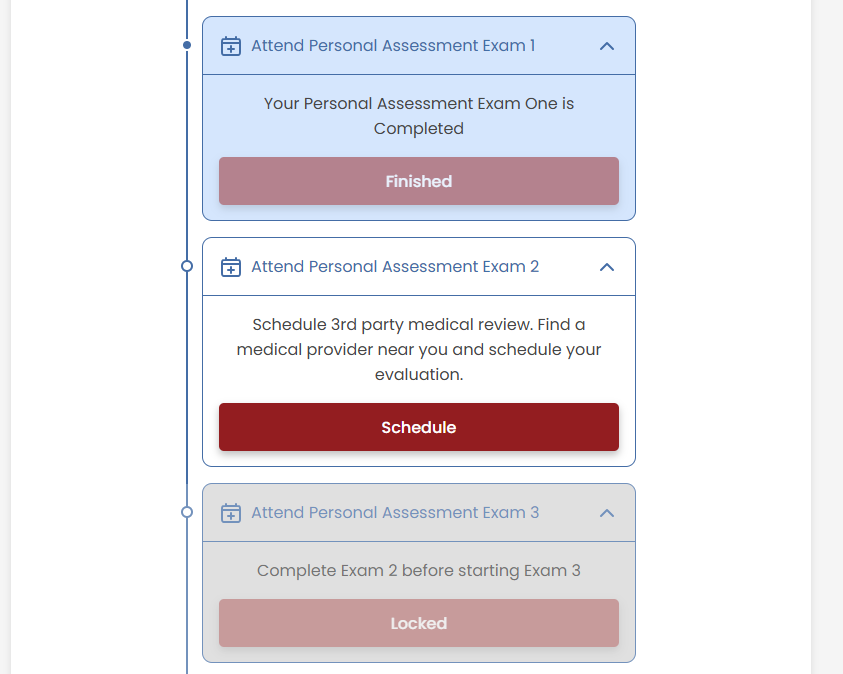
Understanding Locked Steps in the VetVantage Process
The VetVantage process follows a structured flow where each step must be completed before the next becomes available. This ensures that all necessary requirements are met in the correct order, preventing errors and delays.
Step Statuses
Each step in the process falls into one of three categories:
- Completed – Steps that have been fully finished and require no further action.
- In Progress – Steps that are currently available and need to be worked on.
- Locked – Steps that are unavailable until the previous steps are completed.
Why Are Some Steps Locked?
- Certain tasks must be completed in sequence to ensure a smooth process
- For example, the Initial Assessment Questionnaire (IAQ) must be completed before unlocking the rest of the application.
- After submitting conditions and medical history, additional steps such as appointments and PAQs will become available.
How to Unlock a Step
- Check the Next Steps section to identify what needs to be done first.
- Complete the required action (e.g., filling out a form, submitting documents, or scheduling an appointment).
- Once the previous step is finished, the locked step will automatically unlock.
By following this structured process, VetVantage ensures that clients progress smoothly through their application without missing any crucial steps.
Related Articles
How do I use the VetVantage dashboard?
Answer: The dashboard is the central hub that guides clients through the VetVantage process. It provides a clear overview of completed, current, and upcoming steps, ensuring a smooth and structured experience. Using the VetVantage Dashboard The ...What are "Next Steps" and how do I follow them?
Understanding and Following "Next Steps" The "Next Steps" section highlights the immediate action required in the VetVantage process. It dynamically updates as you progress, ensuring you always know what to do next. It serves as a personalized guide ...How did I get locked out of the IAQ?
Answer: You might get locked out of the IAQ for a few reasons, depending on the answers you provided during the assessment. Please reach out to support so someone can help you with this issue. Reasons You May Be Locked Out The VetVantage system ...How do I complete the IAQ?
Steps to Complete the IAQ 1. Access the IAQ Log into your VetVantage account. Navigate to the Initial Assessment Questionnaire (IAQ) section. 2. Answer All Questions Provide accurate information regarding your VA benefits, current rating, dependents, ...How Can I Get the Address for My In-Person Appointment?
Answer: By going to the appointment details page in your VetVantage account Steps to Find Your Appointment Address: 1. Confirm Your Appointment is Approved Check your VetVantage notifications (in-app, email, or text) Ensure your appointment has been ...