How do I upload my medical documents?
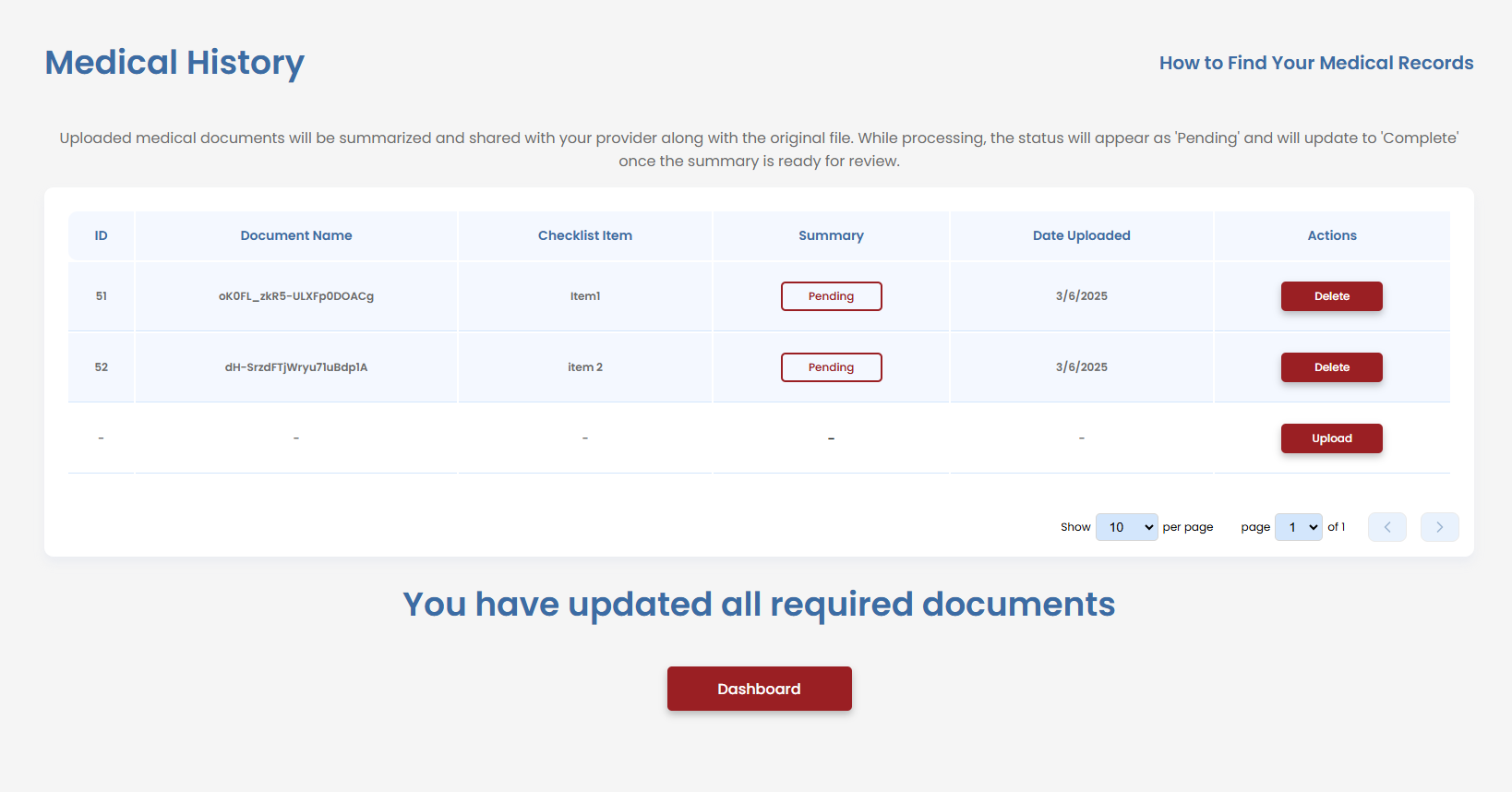
Steps to Upload Your Medical Documents
1. Navigate to the Medical History Page
- Go to the Medical History section in VetVantage
2. Click the "Upload" Button
- Locate the Upload button on the page (as shown in the screenshot)
3. Choose the Correct File
- Select the appropriate medical document from your computer
- Ensure the file is in PDF, JPG, PNG, or DOCX format for compatibility
4. Submit Your File
- Once selected, confirm the upload
- The file will appear in the document list with a Pending status while being processed for summarization
5. Wait for Processing
- Your document will be summarized and reviewed by a provider
- The Summary status will change to Complete once ready for review
If you encounter issues, visit the Support Page here for assistance.
Related Articles
How Do I Get My Medical Documents?
You can access and request your medical documents through the VA website: VA Medical Records Request Accessing Your Medical Records via VA Blue Button The VA Blue Button is a tool that allows veterans to securely view, download, and share their ...Why do I need to submit my medical history?
Your medical history will be summarized and reviewed by your doctor during each visit to ensure accurate assessments of your conditions. The Importance of Submitting Your Medical History Submitting your medical history is a crucial step in the ...How to Upload Supporting Documents to the VA Using AccessVA QuickSubmit
This guide explains how veterans can securely upload supporting documents to the Department of Veterans Affairs through the AccessVA QuickSubmit portal. This process is commonly used to submit medical records, supporting evidence, claim ...How to Download VA Medical Records Online
How to Download Your VA Medical Records Follow the steps below to access and download your medical records through VA.gov using the My HealtheVet system. Step 1 — Sign In to VA.gov Open your web browser and go to the VA.gov website. Select the Sign ...What should I bring to my assessment?
Answer: Bring anything you believe is necessary to support your medical claim for an increase. To ensure that you and your doctor are on the same page, please use ask for the required documents ahead of time. What to Bring? For In-Person ...